興趣嗜好

跳至

首頁

尾頁
   3


子爵府

積分: 10860


5541#
發表於 17-5-29 01:15
回覆 ChunChun_Daddy 的帖子
不如...學A兄貢...玩一次重裝OS...睇睇情況有矛改善?
if 跌士彼刀仲係貢不穩/連game刀黑畫面{巧在唔是藍畫面啫}就試下用on-board display chip{if available}睇睇(當然唔使旨意試game啦},試行d load網頁屎機果d/開下PS/psp睇睇重係咪貢...gd luck~

我都有此打算, 不過照今日情況睇, 應該都係要換display card喇? 可惜冇另一張display card可以試, 我最驚換左display card都係唔得, 咁情況你覺得我應該點搞好呢?


侯爵府

積分: 20653

畀面勳章


5542#
發表於 17-5-29 23:25
回覆 o黑o黑 的帖子
試左好多隻都冇問題, 跟住阿仔就接手玩佢既CSGO, 點知佢玩左十幾分鐘突然又黑哂, 我頂...心情登時跌到落谷底,
我都有此打算, 不過照今日情況睇, 應該都係要換display card喇? 可惜冇另一張display card可以試, 我最驚換左display card都係唔得, 咁情況你覺得我應該點搞好呢?

淨係玩呢隻就出事?之前果d怎試的?load左出黎就蒜?而CSGO玩1xmins便瓜柴...係用max. setting去玩?定典?你要成部機放出黎,唔冚側蓋板睇住黎試{display FAN重係咪run 1x mins後卡住定典;或者係隻game本身有bug? or something else???...}
if你CPU係有埋built-in display chip;我提議你抽走display card;改行內置顯示試下先{if available}
當然...load d簡單game黎試還可以的{如MAME果類...};最好當然有第張display咭試,用返隻CSGO玩,if順利過到1x mins而唔黑mon貢問題好明顯不過;if...借到返黎張咭玩1x mins又係重蹈覆徹...那表示.......
仲有其他硬件問題.....囉.....,
gd luck~


子爵府

積分: 10860


5543#
發表於 17-5-30 00:17
回覆 ChunChun_Daddy 的帖子
淨係玩呢隻就出事?之前果d怎試的?load左出黎就蒜?而CSGO玩1xmins便瓜柴...係用max. setting去玩?定典?你要成部機放出黎,唔冚側蓋板睇住黎試{display FAN重係咪run 1x mins後卡住定典;或者係隻game本身有bug? or something else???...}
if你CPU係有埋built-in display chip;我提議你抽走display card;改行內置顯示試下先{if available}
當然...load d簡單game黎試還可以的{如MAME果類...};最好當然有第張display咭試,用返隻CSGO玩,if順利過到1x mins而唔黑mon貢問題好明顯不過;if...借到返黎張咭玩1x mins又係重蹈覆徹...那表示.......
仲有其他硬件問題.....囉.....,
gd luck~

因為本來係連入game都入唔倒, 一入就dvi no signal, 所以整完後試load入倒game就算, 跟住再試埋其他games全部都成功load倒咪以為搞掂左囉, 跟手裝番側蓋起貨, 點知原來玩多陣都係唔得, 跟住試多幾隻其他games, 全部一模一樣玩一陣就黑屏, 不過就唔係成部機放出黎, 唔冚側蓋睇住試, 所以唔知黑屏時風扇狀態係點, 聽日試下先...

不過真係班唔倒張display咭番黎試, 諗住如果最後都係搞唔掂的話就抬部機去電腦舖, 佢實有display咭可以試, 證實真係display咭打柴就即場換埋佢...

我覺得換display咭機會超高, 你之前換果張好似幾抵玩, 係咪750Ti? 我上珍寶睇過好似有幾隻...


男爵府

積分: 7559


5544#
發表於 17-5-30 17:04
o黑o黑 發表於 17-5-30 00:17
... 搞唔掂的話就抬部機去電腦舖, 佢實有display咭可以試 ...
Keeper will tell u not just display card, but memory also have issues. 3 days later, they'll said mobo also have problem, which will cost you ... say, ... $3K or more.
So, check ur friends n c if they have a spare display. Better off test it urself then rely on 電腦舖.


Now, grab CPU-Z 2 perform stress test n c if display card could run without blank screen. If u want real deal, run FurMark. But when running FurMark, KEEP an EYE at TEMPERATURE. If display continuously running over 80C, ur card might be burn Stress test gives u an idea if ur display would cease function when "game" is running.


"And liftoff, the final liftoff of Atlantis, shoulders of the space shuttle, America will continue the dream."

"Liftoff for the final launch of Endeavor.  'xpending our knowledge, 'xpending our lives in space."

"The final liftoff of Discovery, a tribute to the dedication, hard work and pride of America's space shuttle team."


男爵府

積分: 7559


5545#
發表於 17-5-30 17:05
For new display, ain't sure if 760 is still available. Say, Jumbo no longer have 960 (which was available May '16). Even if they have 760, might b a 倉低貨

2 last thing. For display, 1/ grab one with 4G or more. 3G is OK but have difficulties running game at 1060p. 2/ check if ur PSU (power supply unit) have a 6+2 pin power connector . 9XX and 10XX needs 6 pin power

If ur PSU don't have 6+2 pins connector , grab a converter:


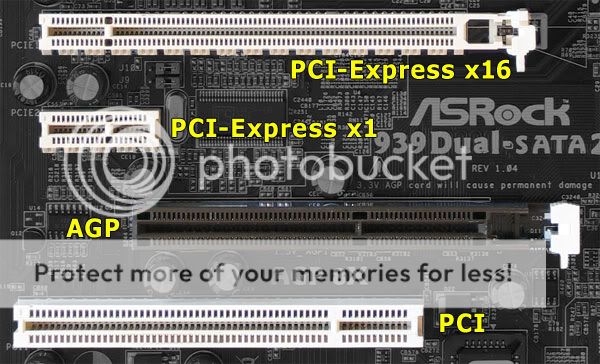
One last thing, check ur mobo to make sure it have PCI-E x16 slot


Good hunting
"And liftoff, the final liftoff of Atlantis, shoulders of the space shuttle, America will continue the dream."

"Liftoff for the final launch of Endeavor.  'xpending our knowledge, 'xpending our lives in space."

"The final liftoff of Discovery, a tribute to the dedication, hard work and pride of America's space shuttle team."


男爵府

積分: 7559


5546#
發表於 17-5-30 17:06
本帖最後由 Aardvark 於 17-5-30 17:07 編輯

Damn! Have to break reply in 2 posts as restrict wording within 2K ch'x
DA FUQ!!!
"And liftoff, the final liftoff of Atlantis, shoulders of the space shuttle, America will continue the dream."

"Liftoff for the final launch of Endeavor.  'xpending our knowledge, 'xpending our lives in space."

"The final liftoff of Discovery, a tribute to the dedication, hard work and pride of America's space shuttle team."


侯爵府

積分: 20653

畀面勳章


5547#
發表於 17-5-30 22:59
回覆 o黑o黑 的帖子
因為本來係連入game都入唔倒, 一入就dvi no signal, 所以整完後試load入倒game就算, 跟住再試埋其他games全部都成功load倒咪以為搞掂左囉, 跟手裝番側蓋起貨, 點知原來玩多陣都係唔得, 跟住試多幾隻其他games, 全部一模一樣玩一陣就黑屏, 不過就唔係成部機放出黎, 唔冚側蓋睇住試, 所以唔知黑屏時風扇狀態係點, 聽日試下先...

不過真係班唔倒張display咭番黎試, 諗住如果最後都係搞唔掂的話就抬部機去電腦舖, 佢實有display咭可以試, 證實真係display咭打柴就即場換埋佢...

我覺得換display咭機會超高, 你之前換果張好似幾抵玩, 係咪750Ti? 我上珍寶睇過好似有幾隻...

hmn....e+情況睇黎係部機散熱嚴重不足;display一來啦;二來主機散不到熱又會谷晒落去機箱裡;大家攬炒....解救:+多把fan吹住cpu/display & +多把抽風或者好dd...
借不到咭刀真係麻煩少少,唯有揀張好少少當然不直容許下揀張中亭位置貢上下啦...
e+不建議你再選750ti了,正如A兄話齋可能屬倉底貨了;再上真寶昅過下...得返1001張750ti :

EVGA GeForce GTX 750 Ti FTW w/ EVGA ACX Cooling (02G-P4-3757-KR) HK$ 1020

呢個價,+多少少少少/差不多接近嘅已經買到呢d了 : {可以for將來新機用}
ASUS華碩 EXPEDITION OC Edition GTX1050TI 4GB GDDR5 雙風扇顯示卡 (DI-E105TF4) HK$1250
GALAX GTX1050TI OC 4GB GDDR5 顯示卡 HK$1140
GIGABYTE技嘉 GTX1050TI LOW PROFILE OC Edition 4GB GDDR5 顯示卡 GV-N105TOC-4GL HK$1120
GIGABYTE技嘉 GTX1050TI WINDFORCE 4GB GDDR5 OC Edition 雙風扇顯示卡 GV-N105TWF2OC-4GD HK$1240
Inno3D GeForce GTX1050TI Compact 4GB GDDR5 顯示卡 HK$1070
MSI微星 GTX1050TI Gaming X 4GB GDDR5 雙風扇顯示卡(DI-N105TG4) HK$1190

諗諗~


侯爵府

積分: 20653

畀面勳章


5548#
發表於 17-5-30 23:02
回覆 Aardvark 的帖子
Damn! Have to break reply in 2 posts as restrict wording within 2K ch'x
DA FUQ!!!

A兄你果post太 details了...又大相又too infomative 先會導致要分開兩個post黎講啫....


子爵府

積分: 10860


5549#
發表於 17-5-31 00:06
回覆 Aardvark 的帖子
Keeper will tell u not just display card, but memory also have issues. 3 days later, they'll said mobo also have problem, which will cost you ... say, ... $3K or more.
So, check ur friends n c if they have a spare display. Better off test it urself then rely on 電腦舖....

Thx A兄圖文並茂詳細解說...

講真我都有d驚驚地, 但如果最後都係班唔倒一張display咭黎試的話, 咁都冇其他辦法了, 不過如果在電腦舖即場插張display咭入去試, 又即刻試出完全冇問題咁就證實係display咭問題, 跟手換埋佢, 唔需要留底部腦, 咁應該唔驚卦?

我都唔知係咪PCI-E x16 slot同6+2 pin power connector添, 我check check先...


子爵府

積分: 10860


5550#
發表於 17-5-31 00:19
回覆 ChunChun_Daddy 的帖子
hmn....e+情況睇黎係部機散熱嚴重不足;display一來啦;二來主機散不到熱又會谷晒落去機箱裡;大家攬炒....解救:+多把fan吹住cpu/display & +多把抽風或者好dd...
借不到咭刀真係麻煩少少,唯有揀張好少少當然不直容許下揀張中亭位置貢上下啦...
e+不建議你再選750ti了,正如A兄話齋可能屬倉底貨了;再上真寶昅過下...得返1001張750ti :

今日打開機箱側蓋黎試, 試左CSGO同RE6, 夾埋玩左都有45分鐘, 居然冇黑屏, 似乎開蓋真係有幫助, 不過發覺lag lag地, 要再進一步降低解像先順番d, 呢個又係display咭柴柴地既訊號?

聽你地咁講真係冇理由仲買750Ti, 而且你介紹呢張GTX1050TI 4GB GDDR5雙風扇顯示卡仲底玩, 不過咁多隻牌子邊個牌子好呢?


男爵府

積分: 7559


5551#
發表於 17-5-31 17:11
本帖最後由 Aardvark 於 17-5-31 17:13 編輯
o黑o黑 發表於 17-5-31 00:19
今日打開機箱側蓋黎試, 試左CSGO同RE6, 夾埋玩左都有45分鐘, 居然冇黑屏, 似乎開蓋真係有幫助, 不過發覺lag lag地, 要再進一步降低解像先順番d, 呢個又係display咭柴柴地既訊號?

...GTX1050TI 4GB GDDR5雙風扇顯示卡仲底玩, 不過咁多隻牌子邊個牌子好呢?

Then add fans la. One in the front and one at the back. And then another one blowing the CPU At least, that's what I did at moment

Brand ... ASUS or Inno3D. Inno3D is founded by a HKer and thus, same model will be cost $50 less. Rumors said if display card fail during warranty, they will borrow a lower end display card to you while repairing. Ain't sure if that's truth or not.

"And liftoff, the final liftoff of Atlantis, shoulders of the space shuttle, America will continue the dream."

"Liftoff for the final launch of Endeavor.  'xpending our knowledge, 'xpending our lives in space."

"The final liftoff of Discovery, a tribute to the dedication, hard work and pride of America's space shuttle team."


侯爵府

積分: 20653

畀面勳章


5552#
發表於 17-6-1 00:00
回覆 o黑o黑 的帖子
今日打開機箱側蓋黎試, 試左CSGO同RE6, 夾埋玩左都有45分鐘, 居然冇黑屏, 似乎開蓋真係有幫助, 不過發覺lag lag地, 要再進一步降低解像先順番d, 呢個又係display咭柴柴地既訊號?

聽你地咁講真係冇理由仲買750Ti, 而且你介紹呢張GTX1050TI 4GB GDDR5雙風扇顯示卡仲底玩, 不過咁多隻牌子邊個牌子好呢?

誠如A兄話齋,粗粗地前後刀+返把fan吹住凍風/抽走熱氣會好d嘅...
我部濕滯從0開始已經是唔冚側蓋板的...一來散熱會巧dd;二來方便我插cable去backup HD/ 2nd W10 HD度嘛{需要動用時}... e+只係跌士彼咭傻的嗎有時唔鬼轉風扇啫,唔太大影響我上網/做野/打game刀由鬼得佢lu...
你case係張display一來散不到熱{之前壞左風扇,搞弱左個gpu不勝負荷了;功能大打折扣}
未柴晒嘅...遇著d要重度loading時咪會卡住窒住一係頂唔順咪又黑屏過你嘆...
哇錫就"相信"會o係用料上比較"膠級"少少貢囉,所以一向刀偏貴過人一等;激+跛次之;其餘嘅會用d公板設計又大多用平價料...所以在價錢上已分左高下...最終睇你個人意向/偏重/不直囉...&+上lucky與否{買呢d野有時刀要睇撞手神的,u know?}
just my 2 cents...


子爵府

積分: 10860


5553#
發表於 17-6-1 00:16
回覆 Aardvark 的帖子
Then add fans la. One in the front and one at the back. And then another one blowing the CPU At least, that's what I did at moment

Brand ... ASUS or Inno3D. Inno3D is founded by a HKer and thus, same model will be cost $50 less. Rumors said if display card fail during warranty, they will borrow a lower end display card to you while repairing. Ain't sure if that's truth or not.

A兄你係點樣加fans架? 機箱入面好似冇乜位喇喎, 定係就咁打開側蓋, 整幾把fans响外面吹住佢呢?

我而家都係用緊ASUS, 或者今次試下其他牌子...


子爵府

積分: 10860


5554#
發表於 17-6-1 00:24
回覆 ChunChun_Daddy 的帖子
誠如A兄話齋,粗粗地前後刀+返把fan吹住凍風/抽走熱氣會好d嘅...
我部濕滯從0開始已經是唔冚側蓋板的...一來散熱會巧dd;二來方便我插cable去backup HD/ 2nd W10 HD度嘛{需要動用時}... e+只係跌士彼咭傻的嗎有時唔鬼轉風扇啫,唔太大影響我上網/做野/打game刀由鬼得佢lu...
你case係張display一來散不到熱{之前壞左風扇,搞弱左個gpu不勝負荷了;功能大打折扣}
未柴晒嘅...遇著d要重度loading時咪會卡住窒住一係頂唔順咪又黑屏過你嘆...
哇錫就"相信"會o係用料上比較"膠級"少少貢囉,所以一向刀偏貴過人一等;激+跛次之;其餘嘅會用d公板設計又大多用平價料...所以在價錢上已分左高下...最終睇你個人意向/偏重/不直囉...&+上lucky與否{買呢d野有時刀要睇撞手神的,u know?}

好, 一於加fans, 不過點加呢? 外面/入面?

睇黎就算換左display咭都要keep住側蓋全開好d, 還記得我個電腦位係好奇特的嗎, 人地衣櫃裡的男人, 我就衣櫃裡的pc


侯爵府

積分: 20653

畀面勳章


5555#
發表於 17-6-2 00:01
回覆 o黑o黑 的帖子
好, 一於加fans, 不過點加呢? 外面/入面?

睇黎就算換左display咭都要keep住側蓋全開好d, 還記得我個電腦位係好奇特的嗎, 人地衣櫃裡的男人, 我就衣櫃裡的pc

衣櫃藏PC....真夠特別; 你話...衣櫃藏嬌就話啫......


+fans....hmn...+前+後/側板?eg :

前面就吹入;後面通常會有個位比你裝一個{PSU附近}抽出;
if 唔夠位放多個,你塊側板可會有沒窿設計?(照計你藏於衣櫃應該刀會冚埋側版,否則熱得滯隨時"慶著"埋d衫褲火燭刀似) 有就裝晌側版吹風入去...


F.Y.R. ...


男爵府

積分: 7559


5556#
發表於 17-6-2 14:39
ChunChun_Daddy 發表於 17-6-2 00:01
I've no idea how to post a cell phone photo and CCD's is, indeed, what I wanna show

Location: I'm using a CoolerMaster tower case and thus, it's had a fan preinstalled at the front an one at back (ignore the one inside PSU). What I did is simply use cable tie and secure the extra at top drive cage. The back fan was secure on a piece of cardboard with tapes and remove all expansion slot guards (silver color metal plate). Then, I put the cardboard and the fan at end of the expansion slot (silver color on left, above pic refers) . Now, since I put nothing at the expansion slot, except the display, so, I have space for installation. Third one simply put it on close to the CPU and have nothing secure it. All fans I'm using are 4 inches.

Power: All three fans have the power draw from the same 4 pins peripheral connector. One end connected to Pin1 (or 4) and the other to Pin2. 12V will have a faster spin whereas 5V is slower. However, as 12V will be noiser, thus, I have mine all connected to 5V. Use 4 pins peripheral is merely convenient as those holes are big enough 4 me for inserting cables. Of couse, u could use vinyl tape to secure those cables (but I didn't). BTW, my PSU is 750W.


Fan: I have them removed from my previous computer and all are 12V and have them installed for, at least, 2 yrs.

And that's it. Have fun with it


"And liftoff, the final liftoff of Atlantis, shoulders of the space shuttle, America will continue the dream."

"Liftoff for the final launch of Endeavor.  'xpending our knowledge, 'xpending our lives in space."

"The final liftoff of Discovery, a tribute to the dedication, hard work and pride of America's space shuttle team."


侯爵府

積分: 20653

畀面勳章


5557#
發表於 17-6-2 22:06
回覆 Aardvark 的帖子
I've no idea how to post a cell phone photo and CCD's is, indeed, what I wanna show

, A兄見笑了!
果d圖嘛...全部係大神幫我搵架乍!
雖則我刀曉若從手機抽出DCIM果folder裡晌Camera影果d相,就貢過落去PC度再post上黎show比你地睇;不過既然大神刀搵到又arm洗/類似野,我就無謂獻醜了....


子爵府

積分: 10860


5558#
發表於 17-6-3 00:12
回覆 ChunChun_Daddy 的帖子
前面就吹入;後面通常會有個位比你裝一個{PSU附近}抽出;
if 唔夠位放多個,你塊側板可會有沒窿設計?(照計你藏於衣櫃應該刀會冚埋側版,否則熱得滯隨時"慶著"埋d衫褲火燭刀似) 有就裝晌側版吹風入去...

唔該哂, 大致上明白, 係d線唔知點插姐, 星期日拆開研究下先...

其實放pc果格衣櫃係放唔倒衣物的, 改裝左變成類似電腦枱的間格, 不過通風/散熱就弱左d, 記得以前好似有放過相上黎...


子爵府

積分: 10860


5559#
發表於 17-6-3 00:21
回覆 Aardvark 的帖子
Location: I'm using a CoolerMaster tower case and thus, it's had a fan preinstalled at the front an one at back (ignore the one inside PSU). What I did is simply use cable tie and secure the extra at top drive cage. The back fan was secure on a piece of cardboard with tapes and remove all expansion slot guards (silver color metal plate). Then, I put the cardboard and the fan at end of the expansion slot (silver color on left, above pic refers) .

唔該哂A兄, 不過唔知我個機箱同你果個係咪差唔多, 不過照計4"風扇應該冇問題卦, 你意思係可以選擇插5v或12v, 不過我冇換過火牛, 而家呢隻好似500W咁上下, 假如加風扇同埋換張1060ti, 火牛頂得順嗎?


男爵府

積分: 7559


5560#
發表於 17-6-3 08:27
本帖最後由 Aardvark 於 17-6-3 08:28 編輯
o黑o黑 發表於 17-6-3 00:21
... 我個機箱同你果個係咪差唔多, 不過照計4"風扇應該冇問題卦...
o黑o黑 發表於 17-6-3 00:21
你意思係可以選擇插5v或12v, 不過我冇換過火牛, 而家呢隻好似500W咁上下, 假如加風扇同埋換張1060ti, 火牛頂得順嗎?

Mine is an ATX, i.e. 大機廂. That's why able to install multiple hard drives

o黑o黑 發表於 17-6-3 00:21
...你意思係可以選擇插5v或12v, 不過我冇換過火牛...

Correct. 5V slower+no sound and 12v faster+louder

o黑o黑 發表於 17-6-3 00:21
而家呢隻好似500W咁上下, 假如加風扇同埋換張1060ti, 火牛頂得順嗎?

Should b OK. But what u really need 2 do is check if u have the 6pin connector for 1060 . If not, grab a converter cable (around $20) or pick a new PSU (recommend Cooler Master 80plusmodel).

Remember check ur mobo regarding PCI-E slot bor


Back 2 ur story, check ur friends n c if they have a spare display b4 grab a new one. Afterall, u want 2 b sure that's the problem of blank screen
"And liftoff, the final liftoff of Atlantis, shoulders of the space shuttle, America will continue the dream."

"Liftoff for the final launch of Endeavor.  'xpending our knowledge, 'xpending our lives in space."

"The final liftoff of Discovery, a tribute to the dedication, hard work and pride of America's space shuttle team."

首頁

尾頁

跳至
Presslogic Logo
Baby Kingdom Logo