原帖由 o黑o黑 於 10-10-22 00:21 發表 
妖, 部腦真係麻q煩, 搞完一樣又到弟二樣, 隻mouse唔知點解無端端罷工, 但係mouse d燈就識著, 就係唔識郁, 用keyboard就ok, 以為mouse壞左, 今日去買隻新番黎試, 點知都係唔得, 已經check過bios usb port全部enable, ...
Here's some suggestions from the web.
Solution 1
- go to Device Manager -> HID-devices -> Unknown Device and search for drivers.
- When prompted for how to search for driver software, select "Browse my computer for driver software"
- Enter "C:\windows\winsxs" for the driver location and press the "Next" button.
- If you get a popup saying "this is an unsigned driver...", just allow Windows to install the driver.
At this point, Windows should select the appropriate driver and your mouse will start working again. When I tried this, only had one of the non-working mice plugged in. When I followed those steps, the mouse started working. I plugged the other mouse in and Windows enabled it without any prompting.
Solution 2
Perform usb reset
In the device manager click on view at the top and in the dropdown
show hidden devices
uninstall all listed usb items
turn the computer off
unplug usb plugs
reboot twice
replug in the usb plugs
Let us know if these work or not.
"And liftoff, the final liftoff of Atlantis, shoulders of the space shuttle, America will continue the dream."
"Liftoff for the final launch of Endeavor. 'xpending our knowledge, 'xpending our lives in space."
"The final liftoff of Discovery, a tribute to the dedication, hard work and pride of America's space shuttle team."
...


>







 ). Thus stick with Bit哥幭.





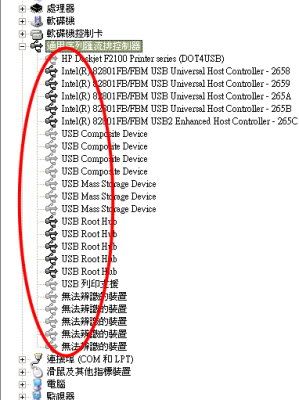
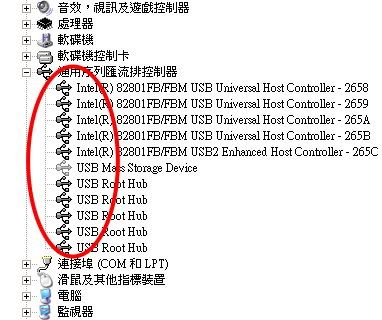
 From above pic, you have three USB stroage device connected to your PC or is it a card reader? Anyhow, as CCD said, remove it and see if it fix your issue or not.

















 發表於
發表於 








 返回列表
返回列表









